

This isn’t the first time the tech giant has been accused of ‘spying’ (Picture: Shutterstock/Getty/Metro)
Google users are being warned that they’re secretly opted in to a feature that allows the tech giant to peek through their emails.
But is this actually the case?
An electronics design engineer posted on X recently that Gmail users are allowing Google to access their email data without realising.
Dave Jones said this could include your personal and work messages as well as uploaded attachments.
This information is used to train Google’s artificial intelligence (AI) chatbot,Gemini,which hoovers up information to learn new skills.
IMPORTANT message for everyone using Gmail. You have been automatically OPTED IN to allow Gmail to access all your private messages & attachments to train AI models. You have to manually turn off Smart Features in the Setting menu in TWO locations.Retweet so every is aware. pic.twitter.com/54FKcr4jO2
— Dave Jones (@eevblog) November 19,2025
Jones,who runs the world’s biggest engineering blog,said the function is part of Gmail’s ‘Smart Features’.
The AI-powered tools automatically categorise emails,create calendar events,suggest replies and sum up shopping order information.
Jones said: ‘You have to manually turn off Smart Features in the Settings menu in TWO locations.’
In Settings under Smart Features,the mode can be switched on and off.
‘When you turn this setting on,you agree to let Gmail,Chat and Meet use your content and activity in these products to provide smart features and personalise your experience.’
Jones added that underneath the tick box,the tools can be further toggled under the ‘Google Workspace smart features’ section.
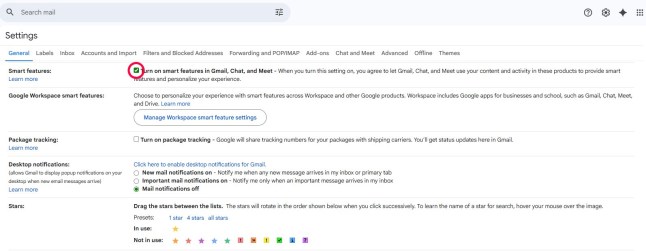
The function,called ‘Smart Features’,can be turned off in the settings (Picture: Google)
Clicking this takes you to a secondary pop-up – opting out also turns off the ‘Ask Gemini’ tool that sums up content and personalises search results.
If you’re on mobile,you can change these settings by going to your settings at the bottom of the inbox menu and selecting: ‘Data privacy’.
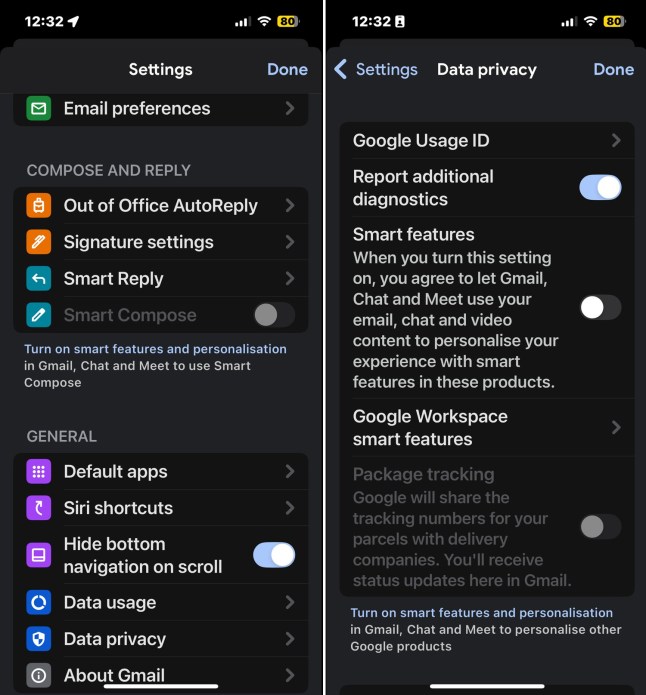
Smart Features can also be turned off via the Gmail mobile app (Picture: Google)
Doing so,however,means you lose out on a lot of features,such as emails being filtered into ‘promotional’ and ‘social inboxes’.
Other tools,like spell and grammar check and autocorrect,are also tied to the Gemini opt-in.
When Metro approached Alphabet,which owns Google,a spokesperson said users don’t exactly have to worry.
They said: ‘These reports are misleading – we have not changed anyone’s settings,Gmail Smart Features have existed for many years,and we do not use your Gmail content for training our Gemini AI model.
‘Lastly,we are always transparent and clear if we make changes to our terms of service and policies.’
The company’s terms of service do not say Google can pry open people’s email inboxes – users keep ownership of their email content.
A lawsuit made against Google in November alleges that the search engine monolith ‘spies on users by default’.
Plaintiff Thomas Thele claims the Gemini AI programme,introduced the month before,was enabled for all popular services without user consent.
The complaint claims the programme tracks personal communications,violating privacy laws.

United News - unews.co.za